Group Leads: catch buying signals in WhatsApp groups
7 min read
If your business lives in WhatsApp groups — property, wholesale, travel, local trade — the enquiries are already there, scrolling past. Group Leads watches the groups your connected number is in and turns messages that match your rules into leads.
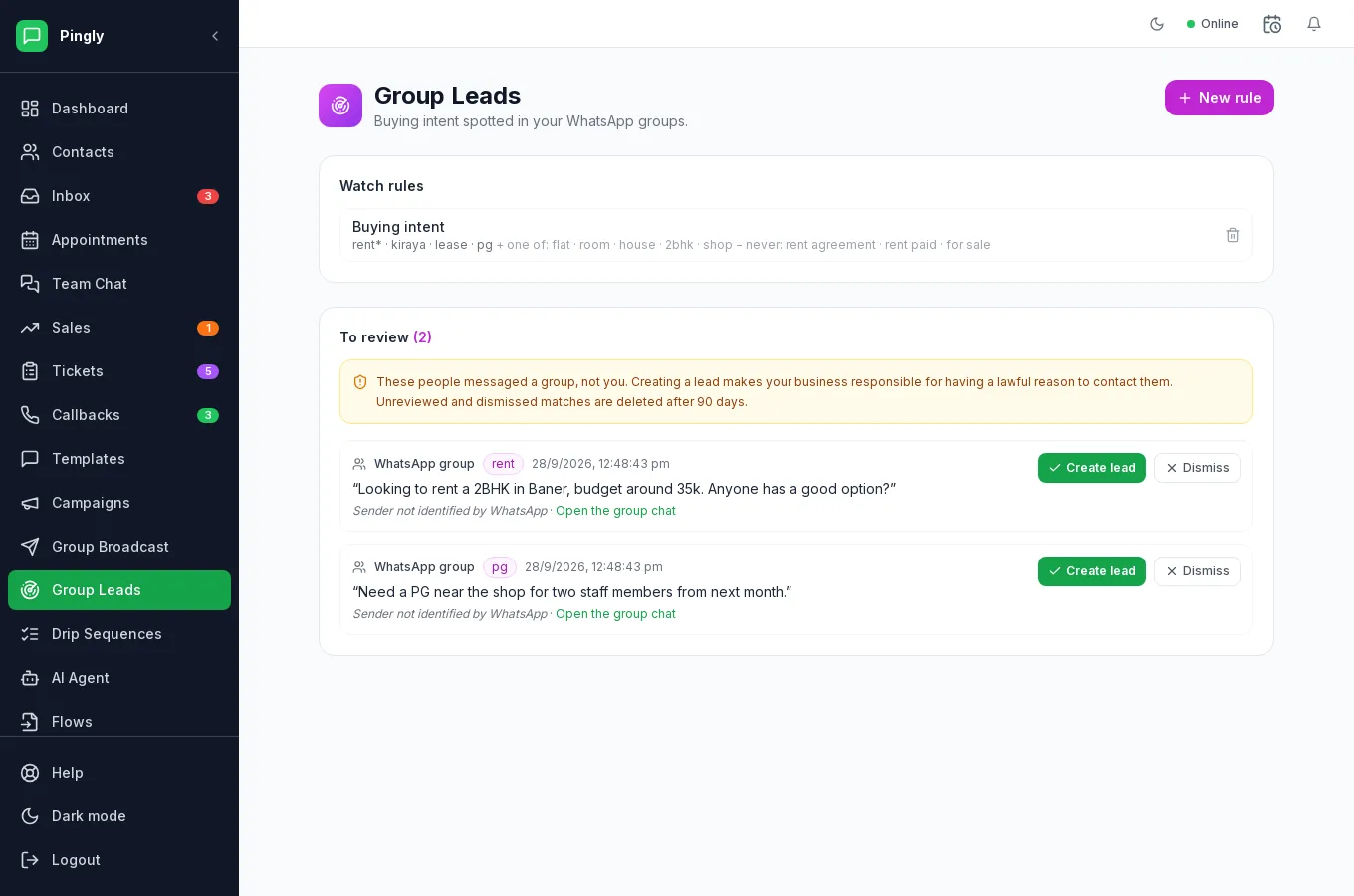
How matching works
This is literal keyword matching, not AI. It does exactly what you tell it, which makes it predictable — and means a rule that is too narrow will quietly catch nothing. A rule has three lists:
| List | On screen | Effect |
|---|---|---|
| Catches | Must contain one of | At least one of these words must appear. This is the only required list. |
| And one of | Must contain | If you fill this in, a word from it must ALSO appear. Use it to narrow. |
| But never | Ignores | If any of these appear, the message is skipped however well it matched. |
Worked example: a letting agent
The rule the placeholders suggest, and what it does:
| List | Words |
|---|---|
| Catches | rent*, kiraya, lease, pg |
| And one of | flat, room, house, 2bhk, shop |
| But never | rent agreement, rent paid, for sale |
- “Looking to rent a 2bhk in Baner” → caught.
- “Anyone know a good PG near the shop?” → caught.
- “Rent paid for the flat, thanks” → skipped, because of But never.
- “Looking to rent a car” → skipped: nothing from the second list.
The star
A trailing * matches any ending, so rent* catches rent, rental, renting and rented. It is a prefix, so it will also catch unrelated words that happen to start the same way — car* matches carpet. Keep stems long enough to be distinctive.
Writing a rule
- Name it for what it finds“Buying intent”, not “Rule 1” — the name appears on every lead it creates.
- Start with Catches onlyPut in the words people actually type, including misspellings and the other languages your groups use. Leave the other two lists empty at first.
- Let it run for a day, then narrowLook at what it caught. Too much noise? Add the common false-positive phrases to But never, or add a second required word with And one of.
What happens to a match
A match does not become a lead on its own. It goes into the To review queue with the matched keyword, an excerpt of the message, the group it came from and a link to open that group chat. You then choose:
- Create lead — it becomes a lead you can work through the pipeline.
- Dismiss — it goes away, and the rule carries on watching.
Unreviewed and dismissed matches are deleted after 90 days, so the queue does not quietly become a permanent store of other people’s messages. Work it regularly.
More in Reach customers at scale
- Message templates: write one Meta will approveVariables, buttons, carousels, approval, and the reasons templates get rejected.
- Campaigns: send a template to thousandsAudience, template, schedule, send — and what the report actually tells you.
- Group broadcast: message WhatsApp groupsSending to WhatsApp groups from a number connected by QR code.
- Drip sequences: follow up automaticallyMulti-step automated follow-ups, triggers, and reading a failure.