Drip sequences: follow up automatically
8 min read
A drip sequence is a series of messages that sends itself over days or weeks. Most enquiries are lost to nobody following up rather than to a decision, and this is the part of that problem you can automate.
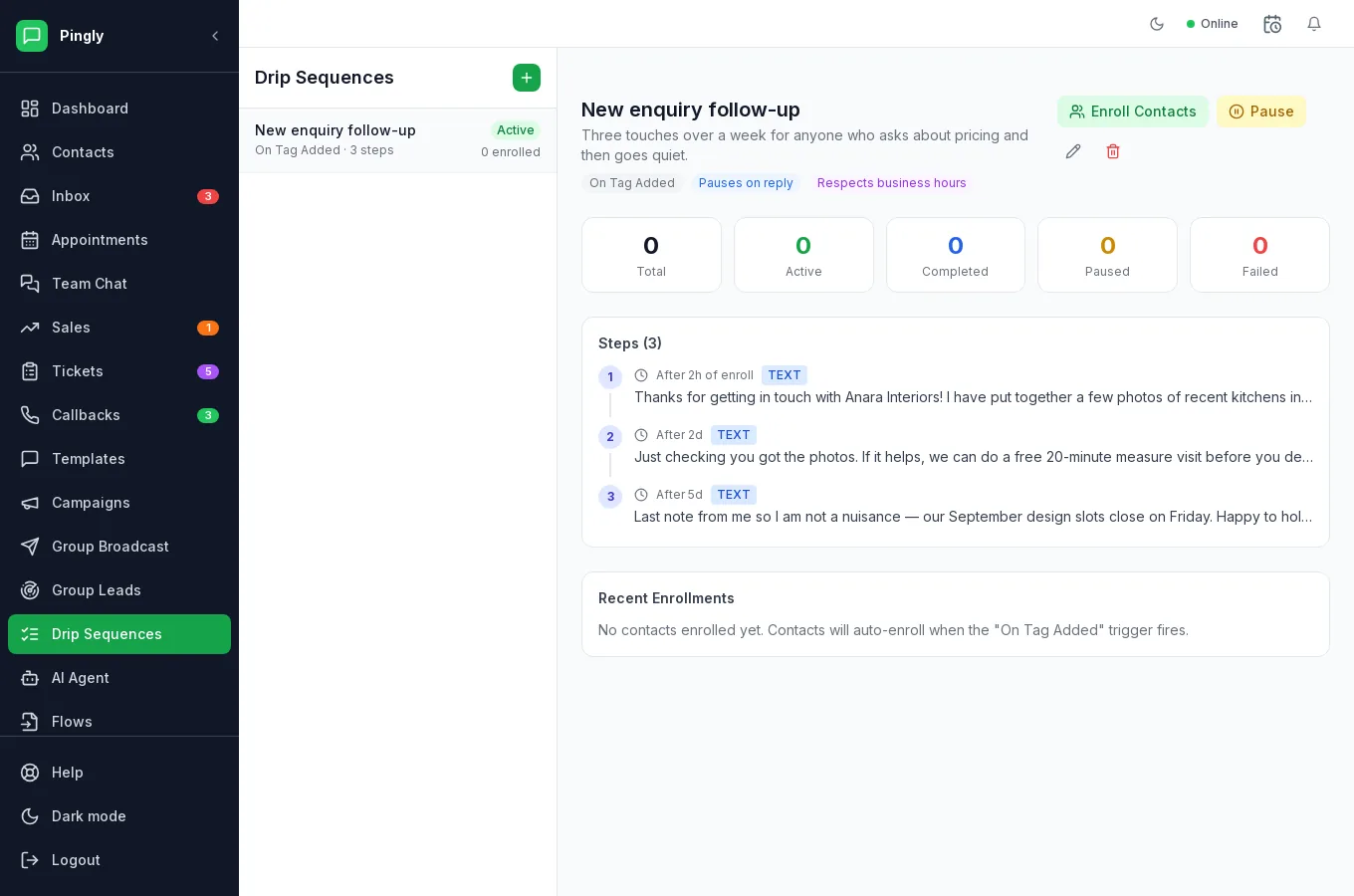
Building one
Open Drip Sequences and create one.
- Name it and choose the triggerThe trigger decides who gets enrolled — see below.
- Leave it inactive while you write the stepsAn active sequence starts enrolling people as soon as it matches. Switch it on last.
- Add your stepsEach step has a delay from the previous one, and a message — free text, or an approved template.
- Set the two togglesPause on reply and Respect business hours. Both should normally stay on.
- Activate itTrigger-based sequences now run by themselves. For a manual one, use Enroll Contacts. The header shows the trigger and both toggles as chips, so you can confirm at a glance what it will do.
Triggers
| Trigger | Enrols someone when |
|---|---|
| Manual | You pick them and enrol them yourself. |
| On tag added | A tag you name is added to a contact. The most useful one — tag on import and the follow-up begins by itself. See Contacts. |
| On opt-in | A contact opts in. |
| On lead created | A new lead is created, including one from Group Leads. |
| On conversation resolved | A conversation is closed — for a follow-up or a satisfaction check. |
The two settings that matter
Pause on reply
If the contact answers, the sequence stops. Leave this on for anything conversational: a person who has replied is now talking to a human, and a reminder arriving on top of that reads as nobody being home. Turn it off only for something like a fixed appointment reminder.
Respect business hours
A step due outside your opening hours waits until you next open instead of arriving at 3am. The hours come from your workspace settings.
When a step fails
A failed send stops that person’s enrolment and records the reason, shown against the enrolment along with which step it died on. That distinction matters: failing at step 1 means the customer never heard from you at all, while failing at step 4 means something changed part-way through.
Common reasons:
| What it says | What to do |
|---|---|
| WhatsApp Direct session not connected | The number is not linked. Check Settings → Numbers. |
| The template this step uses has been deleted | Edit the step and choose another template. |
| This step has no message to send | The step was saved empty — add text or pick a template. |
| A 24-hour window message | Use an approved template for that step instead of free text. |
Writing a sequence people do not mute
- Three steps is usually enough. A useful nudge, a reason to act, and a polite last word.
- Give each step a job. If step 2 says nothing step 1 did not, delete it.
- Say it is the last one. “Last note from me” performs better than a fourth reminder, and costs you nothing in goodwill.
- Make replying easy. The point is to restart a conversation, not to deliver a monologue.
More in Reach customers at scale
- Message templates: write one Meta will approveVariables, buttons, carousels, approval, and the reasons templates get rejected.
- Campaigns: send a template to thousandsAudience, template, schedule, send — and what the report actually tells you.
- Group broadcast: message WhatsApp groupsSending to WhatsApp groups from a number connected by QR code.
- Group Leads: catch buying signals in WhatsApp groupsThree keyword lists, worked examples, and how a match becomes a lead.